
In many families there is one person who "knows everything": remembers the trip, the visit, the formal outfit, the gift and the fact that classes were moved an hour. The other person may be very committed, but only acts when he receives information or a task.
This isn't just a memory problem. Information is scattered, processing takes time, and the state of preparation remains invisible. A shared calendar can change this - as long as it is a place to work together, not just a date preview.
Why does a shared calendar die after two weeks?
A typical start looks good. The family creates a new calendar, chooses colors and enters regular activities. Then a card from kindergarten arrives. Someone takes a photo of it, puts it aside until the evening and forgets about it. After several such situations, one of the parents returns to his or her own notes.
The most common causes are four:
- Adding costs too much attention. The information requires manual rewriting of several fields.
- The event stores the date, but not the preparation. The list of things still lives on the page or in your head.
- The other person can see the deadline but not the work status.
- The reminder comes too late. At 8:00 we already know that the trip is today, but it is impossible to buy the missing items.
Six features of a good family calendar
1. Each caregiver's own account, one family space
Do not share the password for one account. Each person should log in separately and have access to the same family data. Thanks to this, the invitation can be revoked and the actions do not depend on one person's phone.
2. Quick information entry
A manual form is needed for simple appointments. For longer messages, it is useful to import a photo, screenshot, PDF, text or voice note. The result must always be checked before saving.
3. Checklists at the event
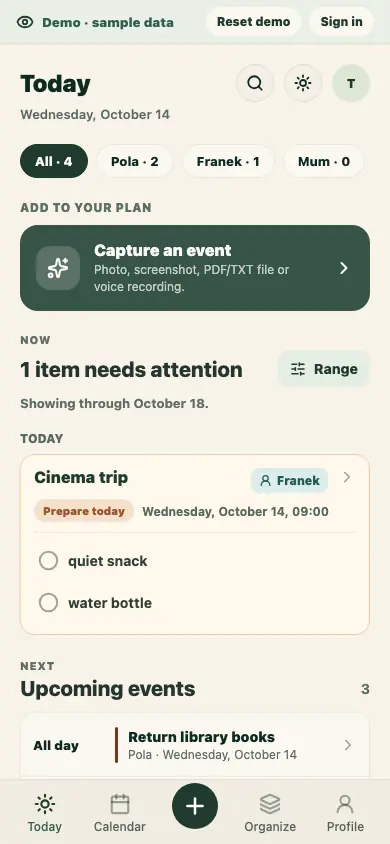
"Friday Ball" should include a list: prepare an outfit, buy a trinket, give consent. Then you don't have to go back to the source message.
4. Advance reminders
Ask not only "when should the event be recalled?" but also "what is the last quiet moment to prepare?" Sometimes it will be the night before, sometimes three days before.
5. Recurring events with exceptions
Add classes every Tuesday as a series. If one lesson is due, cancel only that lesson. When exceptionally it starts later or moves to another day, change the date or times only for that date. Deleting the entire cycle and recreating it later produces errors.
6. Search and connect to your current calendar
Important events should be found by name, person or checklist content. If part of the family uses Google or Apple Calendar, a one-way .ics file or subscription allows you to see the events there as well. A downloaded file contains selected dates as individual events; the revocable subscription keeps repeating series and their exceptions, so refreshed calendars reflect cancelled and moved occurrences. Treat the private link as a secret and revoke it if shared with the wrong person.
How to implement a shared calendar - four steps
- Agree on one authoritative calendar. A date that is not recorded in the shared family space cannot be the basis for an "I told you so" claim. This is a principle that protects both parties.
- Process information immediately. The person who sees the message creates an event or import request instead of sending another screenshot.
- Add preparations. An event without a checklist is incomplete if it requires a purchase, signature, attire or transportation.
- Once a week, look at the plan together. Ten minutes is enough to divide drop-off, pick-up and unfinished mail.
Example: school trip
The message reads: "Departure on September 18 at 7:30, meeting at 7:10. Consent and PLN 40 until September 12. Please bring lunch and a raincoat."
In your calendar, it's a good idea to create:
- "School Trip" event with pick-up and departure time,
- a separate earlier deadline for consent and payment,
- checklist with food, drink and jacket,
- a separate entry with a payment reminder, plus a packing checklist deadline one day before departure,
- assigning the child and information about who picks up the child in the morning.
It's still one message, but the calendar turns it into several action points. This step takes the work off your mind.
Calendar "for checking" or "for action"?
The calendar for checking answers: "what and when?" The action calendar also corresponds to:
- what must be ready,
- who can do it,
- what is already done,
- when to remind,
- where to find details.
If everything is still prepared by one person, simply sharing the view will not change anything. The division of responsibility begins where both see the specific work and can complete it without additional instruction.
Frequently asked questions before the start
Should I also enter private dates?
Only those that affect the family plan. The shared space does not have to be a copy of the entire private calendar.
Do we need multiple colors?
To start, all you need to do is assign the person and type of event. An extensive legend will not fix outdated data.
What about changes to Google or Apple Calendar?
The Ogarniacz subscription is one-way: the external calendar displays family events, but changes made there do not sync back to Ogarniacz. Make changes in Ogarniacz, which remains the source.
Where to start today?
Add one recurring event, one next important date and invite a second guardian. Then process the first real message that comes. This is a better test than spending hours configuring an empty system.
If you start adding an event manually and close the tab, its draft stays on this device for up to 7 days. In Calendar, you can explicitly restore it for editing or delete it; restoring does not save the event to the server.
If the result of saving a manual event is uncertain, Calendar shows its local copy. The app checks fresh server data and tells you whether an event with the same ID already exists. You can open the copy for comparison or delete it. Nothing is resent automatically. If local storage is full or unavailable, the app still tries to save online but cannot promise local recovery after a network error.