
“We remind you that tomorrow the children are bringing their formal attire” - the message had been in the group for a week, but disappeared between the discussion about the class fund and the photos. The trip notice was under the water bottle. Information about the meeting was posted in the school portal.
This does not mean that parents are poorly organized. Important information arrives through many channels, at random times and often in a form that does not clearly state what needs to be done. “Remember everything” is not a system.
Why does school and preschool information slip away so easily?
- There are more channels than habits. Paper notices, the school portal, an app, email, SMS, the class group chat and the entrance noticeboard have different notifications.
- The message comes at a bad time. You read it on the bus or just before bed and postpone action until "later".
- One message contains several dates. The date of the trip, advance payment, consent and outfit preparation are separate things.
- Only one person can see the source. A parent without access to the group only finds out when someone passes the information on.
- The reminder on the day of the event is too late. Missing items cannot always be purchased in the morning.
A system of three rules: one place, right away, in advance
1. One shared place for the outcome
You don't have to transfer the entire conversation or archive all messages. The actionable outcome of the message goes to the shared family space: an event, a list of things, a payment deadline or a note.
Each caregiver should use their own account for the same family. Then the information does not depend on one person’s phone and login details.
2. Process right away
The person who sees the message does one of two things:
- for a short message, they enter the date manually,
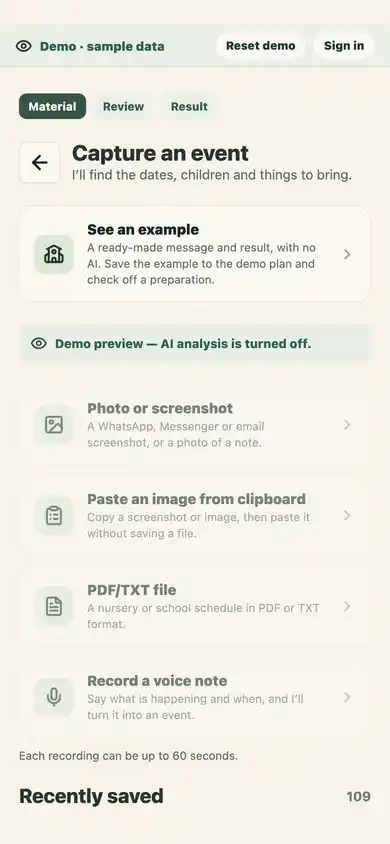
- for a longer message, they take a screenshot or photo and generate suggested events.
Simply sending a screenshot to the other person does not end the matter. It simply creates another inbox.
3. Advance reminder
Set a reminder for the last convenient moment to prepare. For the outfit, it could be the night before. For a document or larger purchase - a few days in advance. If the message has a deadline of "Wednesday", save it separately from the Friday event.
„W piątek teatr. Zgoda do środy, 15 zł i strój galowy.”
Example: theater on Friday
On Tuesday evening, a message appears: "Going to the theater on Friday. Children bring PLN 15 and a formal outfit, consents are due by Wednesday."
Instead of promising yourself that you will come back to it in the morning:
- You take a screenshot limited to the correct message.
- Import proposes an event on Friday and an earlier case on Wednesday.
- You check the dates and add the checklist: consent, PLN 15, attire.
- You set an outfit reminder for Thursday evening.
- You write it down. The second caregiver sees the plan without a separate summary of the conversation.
How to separate information types?
Event
Use it when something is happening on a specific day or time: a meeting, a trip, a performance, a visit.
Checklist at the event
Add the things without which the event is not ready: sign, pay, buy, pack, prepare.
Shopping list
If you're out of glue, an outfit, or snacks, move your purchase to a shared list. Don't just bury it in the event description.
Note
It will be useful for information without a deadline: room number, collection rules, gift ideas or permanent organizational data.
Weekly channel check without constant checking
There is no need to check each channel every hour. Establish a light rhythm:
- a person with access to the e-journal checks new announcements at a fixed time,
- you check the paper from your backpack after returning, before it goes into the pile,
- messages requiring action immediately leave the messenger and go to the common plan,
- once a week you check events with unready checklists.
This changes the job from "remember to check everything" to a few repetitive moments.
Privacy: screenshot should only contain what is needed
The groups include names, phone numbers, photos and conversations of other parents. Before analysis:
- crop the screen to the correct message,
- do not send a list of participants or a previous conversation,
- delete data that is not needed to create an appointment,
- check whether the document does not have additional pages with other information.
Ogarniacz does not store import files as an archive, but the content is processed once by the AI provider. For a full description, please see privacy policy.
What if each parent uses a different calendar?
The shared organizer can remain a source of family data, and a revocable .ics subscription can display events in Google or Apple Calendar. Synchronization is read-only: changes made to the external calendar will not be reflected in Ogarniacz.
The smallest change you can make today
Don't tidy up the whole story. Take the latest message requiring action and see it through to completion: deadline, checklist, reminder, shared view. If you don't have to look for it or hand it over again the next day, the system has already started working.