

It's 5:48 p.m. You come home with your child, you're looking for your keys in one hand, you're holding your backpack with the other, and you hear: "The lady said we should bring a white T-shirt to the show. Probably next week."
There is no firm date yet, so the calendar event would be a guess. Typing a longer text in the hall is also unlikely to help you unpack your shopping. However, you can say into the phone: "White T-shirt for Zosia's play - check the date in the message from the teacher." A few seconds later, it becomes a regular, editable note.
In the evening, you add the correct date or turn the missing T-shirt into an item on your shared shopping list. The matter no longer depended on whether one would remember at the right moment.

The Note is not a waiting room for everything
It's easiest to create a digital mess when each sentence goes into one notebook. After a month, they have the intercom code, a dentist's appointment, milk, a gift idea and a work assignment next to each other. Searching helps, but it is no substitute for deciding what the information really is.
A simple division is enough:
- event has a specific date or time: meeting, visit, performance;
- checklist describes preparation for the event: sign the consent, pack your outfit, print the ticket;
- shopping list contains things to buy: milk, glue, white T-shirt;
- note stores a matter without a specific date: an idea, a finding, a number, a child's quote, or something to check.
If the information answers the question "when?", it should usually be included in the calendar. If the answer is “what to buy?” — for shopping. A note wins when the most important thing is to not lose the content before you decide what to do next.
When is voice better than keyboard?
A voice note is useful not because speaking is always faster. It helps when the cost of entering is too high at the moment:
- you drive a stroller or carry bags,
- you have just left the office and you want to keep one organizational recommendation,
- the child said something that you want to remember right now,
- while walking, an idea for a gift or a trip comes up,
- entering the case manually would mean postponing it until later.
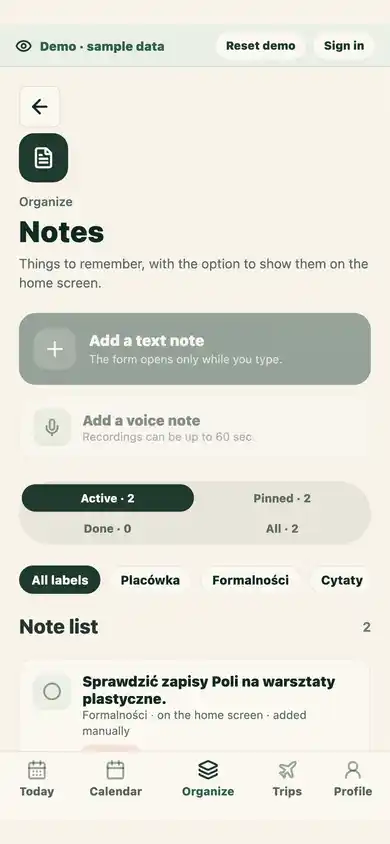
In Ogarniacz the recording is converted into text. After analysis, you work with a regular note: you can correct it, mark it, search for it and mark it as done. This is not an archive of audio files or a voice recorder for storing conversations.
Transcription belongs to the Notes screen and current family. If you leave the screen or change account or family before it finishes, the result will not be saved as a note. Record it again when you return.
You can cancel while the recording is being prepared or captured. Cancelled audio is not sent for analysis.
How to dictate so that the note still makes sense tomorrow?
The best voice note isn't the longest. It makes sense on its own. Instead of saying "check it later", add three things:
- Subject: "white t-shirt for the show."
- Person or context: "for Zosia", "before leaving", "for formalities".
- Next step: "check the date", "ask the doctor", "compare sizes".
An example that will work after a week:
Gift idea for dad: album with photos from the trip. Ask Ola if she has photos from Gdańsk.
An example that probably won't save anything:
Remember this idea we talked about.
After transcription, read the result, especially names, place names and numbers. Speech recognition can misspell a word, and a few seconds of correction is cheaper than having to guess the meaning later.
Three types of notes that will really help your family
Information for reuse
Room number, outfit size, pickup arrangements, list of questions for your next visit. This is undated information, but with clear context. Custom labels, such as "School", "Health" or "Formalities", help you get back to the right set without building an extensive catalog.
Minor matters to wrap up
"Ask about summer camps", "return a borrowed book", "check the size of wellingtons". Not every such thing deserves an event. You can mark a note as done, so it doesn't become a perpetual entry with no status.
Things worth keeping
A quote from a child, an idea for a family ritual, a memory from a trip. These notes don't have to lead to an assignment. However, it is good to get a separate label so that they do not get mixed up with operational matters.
Label, person, status and home screen - four different decisions
These settings answer other questions:
- label says what kind of information it is;
- "Applies to" tells which child or adult the case concerns;
- "I'll take it" optionally indicates the logged-in caregiver who will handle the case - they can release it later;
- Show on Today controls whether an active note appears on Today. Completed notes do not appear there.
Don't pin the entire notebook to your home screen. Choose one or more things that are important now. Otherwise, the home screen will become another list that your eyes learn not to notice.
Scenario: from interrupted information to a calm plan
Let's go back to the white T-shirt.
- In the hall, you record a short note and assign it to Zosia.
- You add the label "School" and turn on "Show on Today" because the active note needs checking.
- In the evening you find a message: the show is on September 12.
- You create an event with a date and a preparation checklist.
- If the T-shirt is missing, add it to the common shopping list.
- Mark the note as done. There is no need to duplicate a ready-made plan.
This is an important last step. The system works not only because it's easy to post something into it, but also because you know when to remove an entry from the current view.
A shared note is not a private diary
Notes in the family space are intended to be shared with invited caregivers. This allows the other person to find the arrangement without asking and see the change in real time. At the same time, it is not a good place for secret notes, passwords or content that other family members should not read.
The voice recording must be submitted to a third-party AI provider for analysis. Ogarniacz does not save the audio file in the database or create recording history; the result is saved as a note. Before recording, limit the content to the information needed in a given case. Details are described in privacy policy.
A new note typed as text and unsaved edits to an existing note can also be saved as drafts on this device. If you close the tab, you can explicitly restore or delete a draft when you return. It is scoped to your account and family, stays on the device for up to 7 days, and is not sent to the server until you restore and save the note. When restoring an edit, review the warning if the note or family changed since the draft was created. Voice recordings are not saved as drafts.
The simplest habit to start with
Don't move old notes around or design the perfect set of labels for a week. Set just one rule:
If the matter does not have a date yet, but it would be a shame to lose it, we write it down immediately - in text or one short recording.
After a week, check which entries have become events, purchases or have been closed. This will show you what labels you really need. A good family notebook doesn't have the most content. It has the fewest things that still need to be kept in your head.